

The LAUNCH CR HD V2 tool comes with pre-installed software, allowing users to use it immediately upon receiving the device. If a software upgrade is needed, you can download the upgrade tool from the official website. This article will explain how to upgrade the LAUNCH CR HD V2 using the official LAUNCH upgrade tool. (This guide can also be used if the user needs to reinstall the software.)
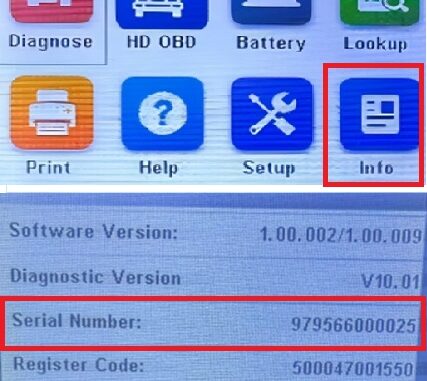
1. The serial number can be found in the [Info] option of the LAUNCH CR HD V2.

2. Find the CR HD V2 update program on the LAUNCH official website [https://en.cnlaunch.com/download/] and download the update program (DIY integration upgrade tool).

3. Unzip the zip file. Install the update program “Creader Series Update.exe” in your computer.


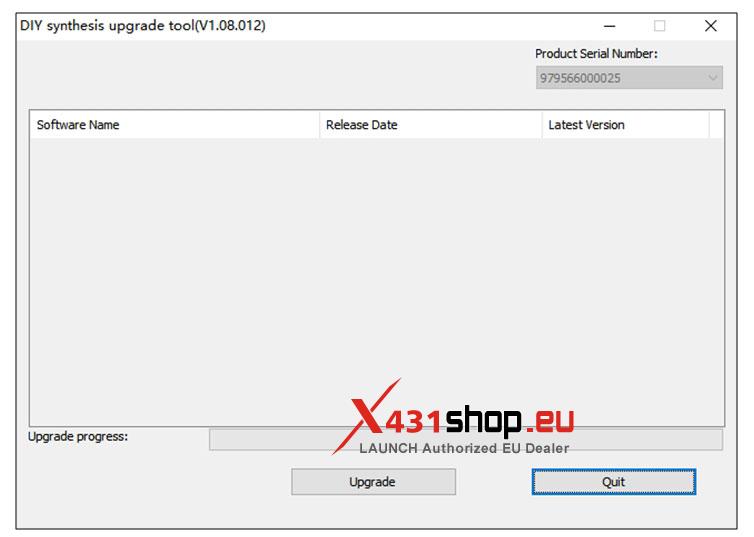
4. Run the update program “Creader Series Update“. The program willdetect the tool and write in the serial number automatically. Click “Device Upgrade” after choosing the language.


5. Choose the Update Software you need, and click “Upgrade“. When the update has finished, the scan tool will display a message “Program Update has been done!”
If the device already has the latest software installed, the update page will be empty.